 Android Framework To be a Senior Android Developer
Related Articles
The Android operating system is built on a layered architecture, where each layer has a specific responsibility. One of the most important layers is the Android Framework Layer, which acts as a bridge between Android applications and the underlying system components.
Whenever you open an app, display a notification, access the camera, retrieve the device’s location, or interact with Bluetooth, your application is communicating with the Android Framework.
Instead of dealing directly with hardware drivers or the Linux kernel, developers use the high-level APIs provided by the Framework. This abstraction makes Android development faster, safer, and more consistent across millions of devices.
In this article, you’ll learn what the Android Framework Layer is, how it works, its architecture, major components, and why it is essential for Android application development.
What is the Android Framework Layer?
The Android Framework Layer is a collection of Java and Kotlin APIs, system services, and application components that provide developers with everything needed to build Android applications.
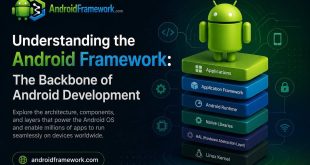
It sits between the Application Layer and the lower-level Android components such as Android Runtime (ART), Native Libraries, and the Hardware Abstraction Layer (HAL).
Applications
      │
      ▼
Android Framework
      │
      ▼
Android Runtime (ART)
Native Libraries
      │
      ▼
Hardware Abstraction Layer (HAL)
      │
      ▼
Linux Kernel
Rather than communicating directly with hardware, applications request services from the Android Framework, which then interacts with the lower layers on their behalf.
Why is the Android Framework Important?
Without the Framework, every application developer would need to:
- Communicate directly with hardware drivers
- Handle memory management manually
- Manage application lifecycles
- Implement security checks
- Control device resources
The Android Framework hides these complexities by providing standardized APIs.
For example, instead of writing low-level GPS communication code, developers simply use:
val locationManager =
    getSystemService(Context.LOCATION_SERVICE) as LocationManager
The Framework takes care of the rest.
Responsibilities of the Android Framework
The Android Framework is responsible for many core system functions, including:
- Managing application lifecycle
- Creating and managing user interfaces
- Handling system resources
- Managing permissions
- Processing user input
- Displaying notifications
- Accessing hardware features
- Managing system services
- Supporting multitasking
- Handling inter-process communication (IPC)
Major Components of the Android Framework
The Framework consists of numerous system services. Each service is responsible for a specific part of the operating system.
Activity Manager
The Activity Manager is responsible for managing application components and their lifecycle.
Responsibilities include:
- Starting activities
- Destroying activities
- Managing tasks
- Maintaining the back stack
- Managing application processes
Example:
startActivity(Intent(this, DetailActivity::class.java))Window Manager
The Window Manager controls everything displayed on the screen.
It manages:
- Activity windows
- Dialogs
- Popups
- Floating windows
- Screen transitions
Every visible application window is managed by the Window Manager.
Package Manager
The Package Manager manages installed applications on the device.
Functions include:
- Installing apps
- Updating apps
- Uninstalling apps
- Retrieving application information
- Managing application permissions
Example:
val info = packageManager.getPackageInfo(packageName, 0)Resource Manager
Android applications store resources separately from code.
Examples include:
- Strings
- Colors
- Images
- Fonts
- Layouts
- Animations
The Resource Manager loads and manages these resources.
Example:
val appName = getString(R.string.app_name)View System
The Android View System is responsible for building the application’s user interface.
Common UI components include:
- TextView
- Button
- EditText
- ImageView
- RecyclerView
- ConstraintLayout
Although modern Android development increasingly uses Jetpack Compose, the underlying rendering infrastructure still relies on Android Framework components.
Notification Manager
The Notification Manager handles all application notifications.
It allows applications to:
- Create notifications
- Update notifications
- Remove notifications
- Create notification channels
Example:
notificationManager.notify(1, notification)Location Manager
The Location Manager provides access to location providers such as:
- GPS
- Network Provider
- Passive Provider
Example:
locationManager.requestLocationUpdates(...)Sensor Manager
The Sensor Manager provides access to hardware sensors.
Supported sensors include:
- Accelerometer
- Gyroscope
- Magnetometer
- Proximity Sensor
- Light Sensor
- Pressure Sensor
Applications can receive real-time sensor data using this service.
Connectivity Manager
The Connectivity Manager monitors network connectivity.
It supports:
- Wi-Fi
- Mobile Data
- Ethernet
- VPN
Example:
val connectivityManager =
    getSystemService(Context.CONNECTIVITY_SERVICE)
Clipboard Manager
The Clipboard Manager allows applications to copy and paste data.
Example:
val clipboard =
    getSystemService(Context.CLIPBOARD_SERVICE)
Input Method Manager
The Input Method Manager controls software keyboards.
It handles:
- Showing the keyboard
- Hiding the keyboard
- Managing input methods
- Switching keyboard languages
Power Manager
The Power Manager helps applications interact with the device’s power system.
Examples include:
- Wake Locks
- Battery optimization
- Sleep mode management
Alarm Manager
The Alarm Manager schedules future tasks.
Common use cases:
- Daily reminders
- Scheduled notifications
- Background operations
Example:
alarmManager.setExact(...)Download Manager
The Download Manager provides a simple API for downloading files.
Example:
DownloadManager.Request(uri)It automatically handles:
- Background downloads
- Network changes
- Download notifications
- Retry mechanisms
Media Framework
The Media Framework supports multimedia functionality.
Capabilities include:
- Audio playback
- Video playback
- Audio recording
- Video recording
- Media streaming
Common classes include:
- MediaPlayer
- AudioTrack
- MediaCodec
- MediaRecorder
Bluetooth Manager
The Bluetooth Manager provides Bluetooth functionality.
It supports:
- Device discovery
- Pairing
- Connecting devices
- Bluetooth Low Energy (BLE)
Camera Framework
Applications access the device camera through the Camera Framework.
Available APIs include:
- Camera API
- Camera2 API
- CameraX
Modern Android development typically recommends using CameraX because it simplifies camera integration while maintaining compatibility across devices.
Telephony Manager
The Telephony Manager provides access to cellular network information.
Examples include:
- Network operator
- SIM status
- Network type
- Device telephony information
How the Android Framework Works
Consider the following scenario where a user taps a button.
User
   │
   ▼
View
   │
   ▼
Android Framework
   │
   ▼
Input Manager
   │
   ▼
Activity
   │
   ▼
Application Code
The Framework receives the input event, processes it through the Input Manager, and delivers it to the application’s Activity.
Similarly, when an application posts a notification:
Application
      │
      ▼
Notification Manager
      │
      ▼
System Server
      │
      ▼
Status Bar
      │
      ▼
User
Android Framework and System Services
Most Android Framework APIs communicate with System Services running inside the system_server process.
Some of the most important services include:
| System Service | Responsibility |
|---|---|
| ActivityManagerService | Activity lifecycle |
| WindowManagerService | Window management |
| PackageManagerService | Installed applications |
| NotificationManagerService | Notifications |
| LocationManagerService | Location services |
| PowerManagerService | Power management |
| AudioService | Audio management |
| ConnectivityService | Network connectivity |
Applications communicate with these services using Binder IPC (Inter-Process Communication).
Advantages of the Android Framework
The Android Framework offers numerous benefits:
- Simplifies Android development
- Provides consistent APIs
- Improves application security
- Reduces development time
- Manages device resources efficiently
- Supports application portability
- Handles compatibility across Android versions
- Provides access to powerful system services
Limitations
Although powerful, the Framework has some limitations:
- Access to certain hardware features is restricted.
- Some APIs require runtime permissions.
- API behavior may differ between Android versions.
- Some advanced hardware capabilities require vendor-specific implementations.
- Developers must consider backward compatibility.
Best Practices
When working with the Android Framework:
- Use official Android APIs whenever possible.
- Follow Activity and Fragment lifecycle guidelines.
- Request only necessary permissions.
- Avoid deprecated APIs.
- Use AndroidX libraries for compatibility.
- Offload long-running work to WorkManager or foreground services when appropriate.
- Test applications across multiple Android versions.
Android Framework vs Android Runtime
| Android Framework | Android Runtime (ART) |
|---|---|
| Provides APIs | Executes application code |
| Manages system services | Compiles bytecode |
| Handles application lifecycle | Performs garbage collection |
| Supports UI development | Manages memory |
| Interacts with System Services | Executes DEX files |
Conclusion
The Android Framework Layer is the foundation of Android application development. It provides developers with a rich set of APIs and system services that simplify interaction with device hardware and the operating system.
From launching activities and managing resources to accessing the camera, location services, sensors, notifications, and networking, nearly every Android application relies on the Framework.
Understanding how the Android Framework works not only helps developers write cleaner and more efficient code but also provides deeper insight into Android’s internal architecture. As you progress in Android development, mastering the Framework becomes essential for building scalable, secure, and high-performance applications.
Frequently Asked Questions (FAQ)
What is the Android Framework Layer?
The Android Framework Layer is a collection of APIs, classes, and system services that allows developers to build Android applications without interacting directly with hardware or the Linux kernel.
Where is the Android Framework located in Android architecture?
It is located between the Application Layer and the lower-level components such as Android Runtime (ART), Native Libraries, and the Hardware Abstraction Layer (HAL).
What are Android System Services?
System Services are background services provided by the Android Framework that manage essential functions such as activities, notifications, networking, power management, and location services.
Does every Android application use the Framework?
Yes. Whether an application is written in Kotlin, Java, or uses Jetpack Compose, it relies on the Android Framework to access operating system features.
Is Jetpack Compose part of the Android Framework?
No. Jetpack Compose is part of the Android Jetpack libraries, not the Android Framework itself. However, Compose ultimately runs on top of the Android Framework and uses its underlying rendering and window management infrastructure.